Quick Start Guide
The simplest way to run particle-tracking-manager is to choose a built-in ocean model and select a location to initialize drifters, then use the built-in defaults for everything else (including start time which defaults to the first time step in the model output). You can do this interacting with the software as a Python library or using a command line interface.
Alternatively, you can run the package with new model output by either setting up a user-input ocean model configuration yaml file or setting one up on the fly. See information for both built-in and user-input ocean models in Ocean Model Configuration.
Details about what setup and configuration are available in Configuration and Setup Options.
Python Package
Run directly from the Lagrangian model you want to use, which will inherit from the manager class. For now there is one option of OpenDriftModel.
import particle_tracking_manager as ptm

m = ptm.OpenDriftModel(steps=1)
m.run_all()
This example uses defaults to fill in important information including the ocean_model (“CIOFSOP”), the start_time (something during CIOFSOP’s time range), lon/lat (a location in Cook Inlet, AK); steps, duration, or end_time is required with start_time. Most users will need to add the ocean_model_local=False flag, if not running on Axiom servers directly.
Then find results in file m.config.output_file.
Command Line Interface
The equivalent for the set up above for using the command line is:
ptm steps=1
To just initialize the simulation and print the OpenDrift configuration to screen without running the simulation, add the --dry-run flag:
ptm steps=1 --dry-run
You can choose to output one or more plots with the plots keyword. For example, the following will output a spaghetti plot made from the track file, using OpenDrift’s plotting capabilities (also running with other inputs):
ptm lon=-151.2 lat=59.1 start_time=2006-02-02T00:00 ocean_model=NWGOA duration="1h" plots="{'spaghetti': {}}"
You can instead run your simulation and then later make plots with:
ptm output_file=[path for outfile including suffix] plots="{'spaghetti': {}}"
m.config.output_file is printed to the screen after the command has been run. ptm is installed as an entry point with particle-tracking-manager.
Note that each plot option should be input in a dictionary but then within a string to be correctly interpreted by the CLI. More information on plot options in PTM is available in Detailed Built-In Plots Demonstration. Many options are available, including animations (see OpenDrift docs for more information).
Python package with local model output
There is a short example of ROMS ocean model output available through xroms that we will use for demonstration purposes. A configuration file for it is included in this package under the name “TXLA”. We will use this example here, but also the configuration file acts as an example template for users who want to set up their own ocean model configuration files. More information on this template here.
To use the “TXLA” ocean model you need to set ocean_model_local=False to access the file correctly.
import particle_tracking_manager as ptm
import ast

m = ptm.OpenDriftModel(lon=-90, lat=28.7, number=10, steps=20,
                       start_time="2009-11-19T13:00",
                       use_static_masks=True, plots={'spaghetti': {}},
                       ocean_model="TXLA", ocean_model_local=False)

m.run_all()
/home/docs/checkouts/readthedocs.org/user_builds/particle-tracking-manager/conda/stable/lib/python3.13/site-packages/tqdm/auto.py:21: TqdmWarning: IProgress not found. Please update jupyter and ipywidgets. See https://ipywidgets.readthedocs.io/en/stable/user_install.html
  from .autonotebook import tqdm as notebook_tqdm
2026-04-09 20:18:25 INFO root.config_logging.setup_logger:54: Particle tracking manager simulation.
2026-04-09 20:18:25 INFO root.config_logging.setup_logger:55: Log filename: output-results_2026-04-09T201825Z.log
2026-04-09 20:18:25 INFO root.config_the_manager.timedir:348: Running model forward in time.
2026-04-09 20:18:25 INFO root.config_the_manager.timedir:348: Running model forward in time.
2026-04-09 20:18:33 INFO root.config_ocean_model.register_on_the_fly:230: Registered new ocean model or altered existing ocean model in the registry.
20:18:37 INFO opendrift:568: OpenDriftSimulation initialised (version 1.14.9)
2026-04-09 20:18:37 WARNING opendrift.readers.reader_ROMS_native.reader_ROMS_native.__init__:187: Vstretching not found, using 1
2026-04-09 20:18:37 WARNING opendrift.readers.reader_ROMS_native.reader_ROMS_native.__init__:187: Vstretching not found, using 1
20:18:37 WARNING opendrift.readers.reader_ROMS_native:187: Vstretching not found, using 1
2026-04-09 20:18:37 WARNING opendrift.readers.reader_ROMS_native.reader_ROMS_native.__init__:310: Duplicate variables for ocean_s_coordinate_g1, selecting s_rho, and discarding s_w
2026-04-09 20:18:37 WARNING opendrift.readers.reader_ROMS_native.reader_ROMS_native.__init__:310: Duplicate variables for ocean_s_coordinate_g1, selecting s_rho, and discarding s_w
20:18:37 WARNING opendrift.readers.reader_ROMS_native:310: Duplicate variables for ocean_s_coordinate_g1, selecting s_rho, and discarding s_w
2026-04-09 20:18:37 INFO opendrift.readers.reader_ROMS_native.reader_ROMS_native.__init__:317: The following variables without standard_name are discarded: ['angle', 'hc', 'Cs_r', 'Cs_w', 'mask_u', 'mask_v', 'Vtransform', 'pm', 'pn', 'f', 'lon_rho', 'lat_rho', 'ocean_time', 'lon_u', 'lat_u', 'lon_v', 'lat_v']
2026-04-09 20:18:37 INFO opendrift.readers.reader_ROMS_native.reader_ROMS_native.__init__:317: The following variables without standard_name are discarded: ['angle', 'hc', 'Cs_r', 'Cs_w', 'mask_u', 'mask_v', 'Vtransform', 'pm', 'pn', 'f', 'lon_rho', 'lat_rho', 'ocean_time', 'lon_u', 'lat_u', 'lon_v', 'lat_v']
20:18:37 INFO opendrift.readers.reader_ROMS_native:317: The following variables without standard_name are discarded: ['angle', 'hc', 'Cs_r', 'Cs_w', 'mask_u', 'mask_v', 'Vtransform', 'pm', 'pn', 'f', 'lon_rho', 'lat_rho', 'ocean_time', 'lon_u', 'lat_u', 'lon_v', 'lat_v']
2026-04-09 20:18:37 WARNING opendrift.readers.basereader.structured.structured.__init__:50: No proj string or projection could be derived for reader TXLA, using 'fakeproj'.
2026-04-09 20:18:37 WARNING opendrift.readers.basereader.structured.structured.__init__:50: No proj string or projection could be derived for reader TXLA, using 'fakeproj'.
2026-04-09 20:18:37 WARNING opendrift.readers.basereader.structured.structured.__init__:50: No proj string or projection could be derived for reader TXLA, using 'fakeproj'.
20:18:37 WARNING opendrift.readers.basereader.structured:50: No proj string or projection could be derived for reader TXLA, using 'fakeproj'.
2026-04-09 20:18:37 INFO opendrift.readers.basereader.structured.structured.__init__:81: Loading previously saved interpolator for lon,lat to x,y conversion.
2026-04-09 20:18:37 INFO opendrift.readers.basereader.structured.structured.__init__:81: Loading previously saved interpolator for lon,lat to x,y conversion.
2026-04-09 20:18:37 INFO opendrift.readers.basereader.structured.structured.__init__:81: Loading previously saved interpolator for lon,lat to x,y conversion.
20:18:37 INFO opendrift.readers.basereader.structured:81: Loading previously saved interpolator for lon,lat to x,y conversion.
20:18:37 INFO root:296: Using seed_flag "elements".
20:18:37 INFO root:296: Using seed_flag "elements".
20:18:37 INFO root:296: Using seed_flag "elements".
20:18:37 INFO opendrift.models.basemodel.environment:227: Fallback values will be used for the following variables which have no readers:
20:18:37 INFO opendrift.models.basemodel.environment:230: x_wind: 0.000000
20:18:37 INFO opendrift.models.basemodel.environment:230: y_wind: 0.000000
20:18:37 INFO opendrift.models.basemodel.environment:230: upward_sea_water_velocity: 0.000000
20:18:37 INFO opendrift.models.basemodel.environment:230: ocean_vertical_diffusivity: 0.000000
20:18:37 INFO opendrift.models.basemodel.environment:230: sea_surface_wave_significant_height: 0.000000
20:18:37 INFO opendrift.models.basemodel.environment:230: sea_surface_wave_stokes_drift_x_velocity: 0.000000
20:18:37 INFO opendrift.models.basemodel.environment:230: sea_surface_wave_stokes_drift_y_velocity: 0.000000
20:18:37 INFO root:168: start_time: 2009-11-19 13:00:00, end_time: 2009-11-19 14:40:00, steps: 20, duration: P0DT1H40M0S
20:18:37 INFO root:296: Using seed_flag "elements".
20:18:37 INFO root:348: Running model forward in time.
20:18:37 INFO opendrift:1894: Skipping environment variable upward_sea_water_velocity because of condition ['drift:vertical_advection', 'is', False]
20:18:37 INFO opendrift:1894: Skipping environment variable ocean_vertical_diffusivity because of condition ['drift:vertical_mixing', 'is', False]
20:18:37 INFO opendrift:1894: Skipping environment variable ocean_mixed_layer_thickness because of condition ['drift:vertical_mixing', 'is', False]
20:18:37 INFO opendrift:1905: Storing previous values of element property lon because of condition (('general:coastline_action', 'in', ['stranding', 'previous']), 'or', ('general:seafloor_action', 'in', ['previous']))
20:18:37 INFO opendrift:1905: Storing previous values of element property lat because of condition (('general:coastline_action', 'in', ['stranding', 'previous']), 'or', ('general:seafloor_action', 'in', ['previous']))
20:18:37 WARNING opendrift:1993: Simulation end is not at an output time step. Extending duration from 1:40:00 to 2:00:00
20:18:37 INFO opendrift:947: Using existing reader for land_binary_mask to move elements to ocean
2026-04-09 20:18:37 INFO opendrift.readers.reader_ROMS_native.reader_ROMS_native.mask_rho:367: Using mask_rho for mask_rho
2026-04-09 20:18:37 INFO opendrift.readers.reader_ROMS_native.reader_ROMS_native.mask_rho:367: Using mask_rho for mask_rho
20:18:37 INFO opendrift.readers.reader_ROMS_native:367: Using mask_rho for mask_rho
20:18:37 INFO opendrift:978: All points are in ocean
20:18:37 INFO opendrift:2202: 2009-11-19 13:00:00 - step 1 of 24 - 10 active elements (0 deactivated)
2026-04-09 20:18:37 INFO opendrift.readers.reader_ROMS_native.reader_ROMS_native.mask_u:388: Using mask_u for mask_u
2026-04-09 20:18:37 INFO opendrift.readers.reader_ROMS_native.reader_ROMS_native.mask_u:388: Using mask_u for mask_u
20:18:37 INFO opendrift.readers.reader_ROMS_native:388: Using mask_u for mask_u
2026-04-09 20:18:37 INFO opendrift.readers.reader_ROMS_native.reader_ROMS_native.mask_v:409: Using mask_v for mask_v
2026-04-09 20:18:37 INFO opendrift.readers.reader_ROMS_native.reader_ROMS_native.mask_v:409: Using mask_v for mask_v
20:18:37 INFO opendrift.readers.reader_ROMS_native:409: Using mask_v for mask_v
2026-04-09 20:18:37 INFO opendrift.readers.reader_ROMS_native.reader_ROMS_native.angle:432: Using angle from Dataset.
2026-04-09 20:18:37 INFO opendrift.readers.reader_ROMS_native.reader_ROMS_native.angle:432: Using angle from Dataset.
20:18:37 INFO opendrift.readers.reader_ROMS_native:432: Using angle from Dataset.
20:18:37 INFO opendrift:2202: 2009-11-19 13:05:00 - step 2 of 24 - 10 active elements (0 deactivated)
20:18:37 INFO opendrift:2202: 2009-11-19 13:10:00 - step 3 of 24 - 10 active elements (0 deactivated)
20:18:37 INFO opendrift:2202: 2009-11-19 13:15:00 - step 4 of 24 - 10 active elements (0 deactivated)
20:18:37 INFO opendrift:2202: 2009-11-19 13:20:00 - step 5 of 24 - 10 active elements (0 deactivated)
20:18:37 INFO opendrift:2202: 2009-11-19 13:25:00 - step 6 of 24 - 10 active elements (0 deactivated)
20:18:37 INFO opendrift:2202: 2009-11-19 13:30:00 - step 7 of 24 - 10 active elements (0 deactivated)
20:18:37 INFO opendrift:2202: 2009-11-19 13:35:00 - step 8 of 24 - 10 active elements (0 deactivated)
20:18:37 INFO opendrift:2202: 2009-11-19 13:40:00 - step 9 of 24 - 10 active elements (0 deactivated)
20:18:37 INFO opendrift:2202: 2009-11-19 13:45:00 - step 10 of 24 - 10 active elements (0 deactivated)
20:18:37 INFO opendrift:2202: 2009-11-19 13:50:00 - step 11 of 24 - 10 active elements (0 deactivated)
20:18:37 INFO opendrift:2202: 2009-11-19 13:55:00 - step 12 of 24 - 10 active elements (0 deactivated)
20:18:37 INFO opendrift:2202: 2009-11-19 14:00:00 - step 13 of 24 - 10 active elements (0 deactivated)
20:18:37 INFO opendrift:2202: 2009-11-19 14:05:00 - step 14 of 24 - 10 active elements (0 deactivated)
20:18:37 INFO opendrift:2202: 2009-11-19 14:10:00 - step 15 of 24 - 10 active elements (0 deactivated)
20:18:37 INFO opendrift:2202: 2009-11-19 14:15:00 - step 16 of 24 - 10 active elements (0 deactivated)
20:18:37 INFO opendrift:2202: 2009-11-19 14:20:00 - step 17 of 24 - 10 active elements (0 deactivated)
20:18:37 INFO opendrift:2202: 2009-11-19 14:25:00 - step 18 of 24 - 10 active elements (0 deactivated)
20:18:37 INFO opendrift:2202: 2009-11-19 14:30:00 - step 19 of 24 - 10 active elements (0 deactivated)
20:18:37 INFO opendrift:2202: 2009-11-19 14:35:00 - step 20 of 24 - 10 active elements (0 deactivated)
20:18:37 INFO opendrift:2202: 2009-11-19 14:40:00 - step 21 of 24 - 10 active elements (0 deactivated)
20:18:37 INFO opendrift:2202: 2009-11-19 14:45:00 - step 22 of 24 - 10 active elements (0 deactivated)
20:18:37 INFO opendrift:2202: 2009-11-19 14:50:00 - step 23 of 24 - 10 active elements (0 deactivated)
20:18:37 INFO opendrift:2202: 2009-11-19 14:55:00 - step 24 of 24 - 10 active elements (0 deactivated)
20:18:37 WARNING opendrift:2565: Plotting fast. This will make your plots less accurate.
20:18:42 INFO opendrift:3899: Time to make plot: 0:00:04.676096
20:18:42 INFO opendrift:247: Saved plot to output-results_2026-04-09T201825Z_spaghetti_fast_True.png
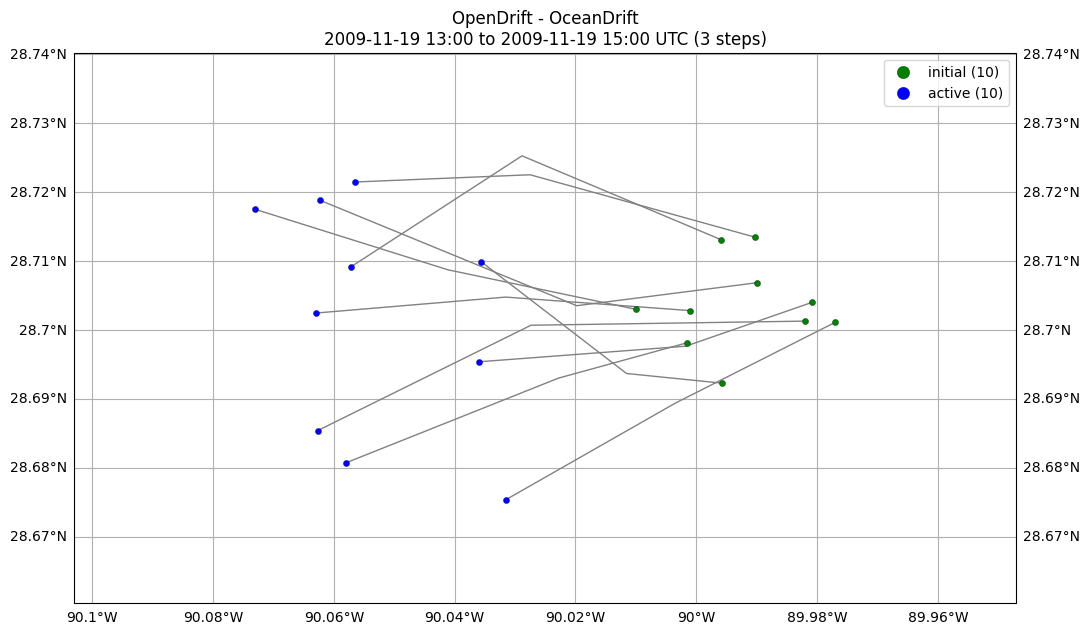
You can access the plot name as follows (note you need to use ast.literal_eval() because plots is stored as a string in the file).
ast.literal_eval(m.config.plots)["spaghetti"]["filename"]
'output-results_2026-04-09T201825Z_spaghetti_fast_True.png'
Ways to Get Information
Check drifter initialization properties:
m.initial_drifters
Look at reader/ocean model properties:
m.reader
Get reader/ocean model properties (gathered metadata about model):
m.reader_metadata(<key>)
Show schema details — many more details on this in Configuration and Setup Options:
m.config.model_json_schema()
Show configuration values for your model:
m.config.model_dump()